BUILD LOG · 2026
I wanted demo videos, so I built a studio for my agents
When I finished writing I stopped watching my agents work and started listening, I still had one problem.
The post described Focus, Ready, Live mode, and voices for different agent lines. Those ideas made more sense when I could see and hear them, and I wanted a short demo video for each section.
I could have recorded the videos by hand. I also knew what would happen. I would record one, notice the pacing was wrong, record it again, find a typo, record it again, change the post, and then have to decide whether I cared enough to record it one more time.
So I asked Copilot to help me build a way to direct the videos from source.
That little helper became Dailies.
The first version was an editor, a terminal, and a voice
The first Dailies scenarios were Markdown files.
One block described what should appear in an editor. Another described the commands and fixture output in a terminal. Audio cue blocks named the speaker, the text, the voice, and the generated file.
The result looked a little like this:
demos/tsrs/queue.demo.md
demos/tsrs/live-mode.demo.md
demos/tsrs/line-voices.demo.md
Then the agent could run the same loop until the candidate was worth watching.
npm run check
npm run render:candidate -- demos/tsrs/line-voices.demo.md --provider kokoro
Dailies compiled a timeline, rendered a browser preview, generated the narration, captured an MP4, sampled frames, and checked the output. The terminal commands were fixture text, so making a Relay demo did not mean touching my real Relay queue.
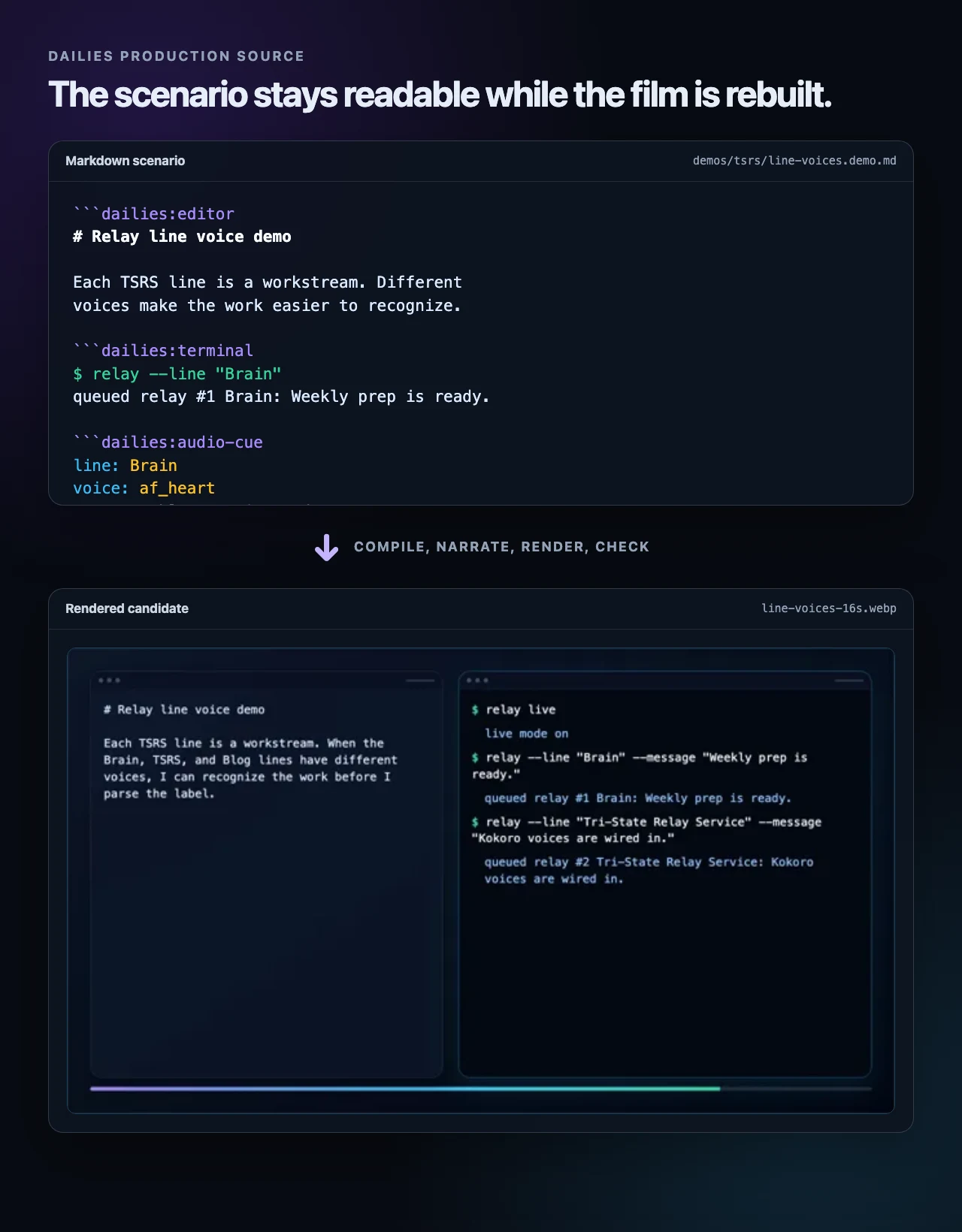
The rendered cut was what I reviewed, and the source file became where the agent and I made the next round of changes.
When the pacing felt slow or a sentence sounded wrong, I gave a note and the agent updated the scenario. The set changed the same way after I decided the window chrome took up too much room.
I was no longer trying to describe a video to an agent and hoping it understood. The agent could read the scenario, the compiled timeline, the preview, the render manifest, and the sampled frames. The checks caught broken output before it handed me a candidate.
Relay and ZShot are optional
Dailies grew out of the Relay videos, and I like that the two tools still fit together.
The scenarios can stage relay commands, and Dailies can use the same local voice-provider boundary I built for Tri-State Relay Service. The commands are still fixtures, so Relay does not need to be running.
My friend @netshade built ZShot, and Dailies uses it to record the browser stage when it is available. Otherwise it falls back to a small Chrome DevTools renderer.
Then I wanted a studio
The editor and terminal set worked for Relay, but other stories needed a control room, program monitor, browser, or full-screen video. I also wanted to bring existing footage into a production without turning Dailies into a normal video editor.
A scenario could now choose a set for the room, add narration with audio cues, and place a window from an existing MP4 into one of the panels.
For the video fixtures, deterministic capture mattered more than pressing play. Browser video seeking kept producing the wrong decoded frame, so the agent changed the approach. ffmpeg extracts the declared source window first, the timeline maps each output time to an exact image, and Chrome draws that image into the set before taking the screenshot.

Extracting the frames first is more work than dropping a <video> tag on the page, but the same timeline frame now asks for the same source frame every time.
The studio stayed small. There is no draggable timeline, plugin system, or pile of arbitrary tracks. The source can choose a set, theme, panel, crop, fade, caption, and final hold. So far that has been enough.
We made Dailies direct itself
Once Dailies could play video inside a set, I wanted to see how recursive we could make it.
I asked whether a Dailies video could become the footage for the new Dailies video feature. It felt a little like the scene in Spaceballs where they watch Spaceballs, except Dailies would use its own film as footage for the next one.
The agent built a five-act feature reel about how Dailies works. We rendered it, committed the MP4 as a fixture, and then created an outer production that played three windows from that film inside a studio monitor.
The first result worked. And it was also boring.
The program monitor did not have enough to look at. The story was short. The styling felt like another version of a theme I was already tired of. I told the agent it needed more Apple and Pixar polish, and asked it to try something closer to an early Macintosh.
It rebuilt the room as a System 7-inspired director’s desk.
Then I pointed out that the menus were on the wrong side. The window title needed to be centered. The voices sounded robotic. The progress bar moved independently from the timer. Act II had no narration. Act III left a long stretch of dead air while the scenario source finished typing.
After a few rounds, Dailies started to feel like a studio. I gave production notes, and the agent rebuilt the candidate from the same source.
The final video is now in the Dailies README. It shows the inner Dailies film playing inside the outer Dailies film while the source and commands remain visible beside it.
Preparing it for other people was part of the fun
Once the demo felt good, I asked the agent to help me prepare the whole project for open source.
While I was focused on whether the film was any good, the agent also did a bunch of release work that I barely noticed until I looked back through the commits. Dailies ended up with 28 tests, CI, an ISC license, a cleanup command, contribution and security docs, an artifact policy, and provenance files for both showcase videos.
We reviewed the full Git history and removed material I did not want to publish. We rewrote the README around the public user journey. We figured out that GitHub only renders native video controls for an uploaded attachment URL, so I dragged the finished MP4 into an issue and gave the agent the URL it needed.
Then the agent created github.com/jonmagic/dailies, pushed the sanitized history, watched CI, checked the public README, and kept fixing the parts that did not work the way we expected.
I was mostly paying attention to the video. By the time we published the repo, there was a real little open source project around it.
I like being the producer
After all of that automation, my favorite part was pressing play.
By the time I watched a cut, the files had passed their checks and every frame had rendered. I was watching for a different problem, whether the film was boring and what I wanted changed.
Some of those notes will probably become systemic improvements.
I am not sure every post needs a video, but the next time something makes more sense when you can see it, I can direct the source and review cuts instead of recording and editing everything by hand.