How I Work, 2025 Edition
I took this week off to reflect and spend some time closer to the mountains as I start my forty-fourth year on this planet. One of the things I’ve been thinking about and have been meaning to write about is how my processes and tools have evolved over the past two decades.
Most productivity systems, the processes and tools, optimize for the wrong brain—someone else’s. I spent years trying to adopt systems that worked for the people I look up to because of their brilliance and productivity but time after time I abondoned the prescribed workflows. They just didn’t stick for one reason or another.
Eventually I realized that my brain, not theirs, is what I should be designing for. I still look to others for new ideas and optimizations but now I time box my evaluation and then adapt or abandon.

That is probably one of the most important things I can share in this post, that optimizing how you work isn’t something you tackle in a weekend and then you’re done. It’s a marathon of experimentation, reflection, and adaptation.
Our brains are constantly changing as they consume new information, and we experience chemical changes due to aging, so the process is necessarily lifelong and iterative. The tools and processes that work for you today may not work for you in a year or two. You have to keep tuning and adapting.
This post is a reflection on how I work at the end of 2025, some of it new, but lots of it old.
Two Mental Frameworks I Consistently Use
There are two primary frameworks I use day to day, week to week, month to month, and year to year to keep myself organized and productive.
PRIME
Five verbs shape my week. I use them to guide my weekly planning and daily execution.
- Plan: Reduce ambiguity by formulating a narrative arc and naming what “better” looks like.
- Refine: Shorten loops by improving tools, templates, and paved paths.
- Integrate: Connect efforts across teams, carry context, and make status legible.
- Mentor: Grow people via pairing, reviews, and unblocking; learn out loud together.
- Execute: Ship the smallest credible artifact that forces a decision.
These five words are somewhat of a mantra for me (a term I first learned about from Guy Kawasaki more than two decades ago). My mantra from 2020 to 2024 was “I will listen, I will learn, I will teach, and I will serve”.
It sounds silly but this little exercise has helped me maintain focus throughout a day, a week, a month, and even a year or more. My brain spends less time traveling down counter producive paths when I can return to these five words to reorient myself.
SWOT
My mantra is a direct result of me consistently analyzing myself using a framework like SWOT (Strengths, Weaknesses, Opportunities, Threats). When I first learned about the SWOT analysis framework in college I started applying it once or twice a year to my personal and professional life with great results. Over time I’ve used it more frequently to the point where it’s part of my daily mental model driving how I think and make decisions.
There are other great frameworks like SOAR (Strengths, Opportunities, Aspirations, Results) that focus more on the positive. SWOT always stuck for me because I learned it first but I think the important thing is finding a repeatable mental model that helps guide decisions and trade-offs consistently.
My Workflow
My workflow centers on a single folder I call my brain—a directory of Markdown files that starts with a Weekly Notes/Week of <yyyy-mm-dd>.md file for each week which then flow into Meeting Notes/<handle>.md files, which wikilink to Transcripts/<yyyy-mm-dd>/<nn>.md and Executive Summaries/<yyyy-mm-dd>/<nn>.md files, and then into Daily Projects/<yyyy-mm-dd>/ folders for day-level scratchpads and context dumps.
On Sunday evening, I open VS Code Insiders and run a single command from a custom VS Code extension (I had Copilot help me build) to create my new Week of ... file from a template. Then I do something deliberately manual, I open my calendar and manually type in each meeting in the Weekly Notes file and block out focus time on the calendar. This takes about ten minutes and feels like a warm-up before a run. By the time I’m done, my brain holds the week’s shape—meetings clustered here, deep work carved out there, the main threads I’ve chosen to move forward sitting at the top.
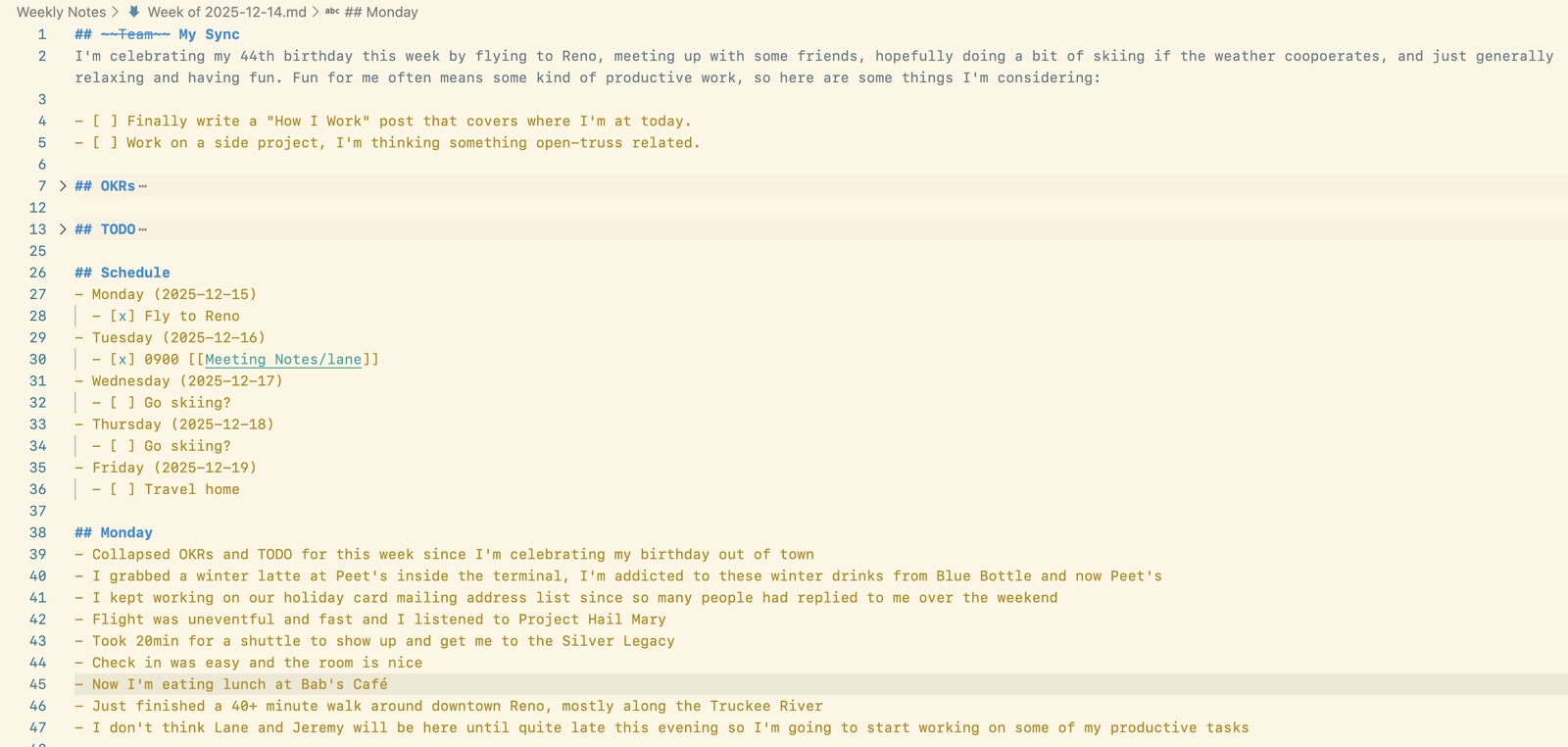
Manual priming helps me create the narrative arc. Automation could populate my schedule faster, but I wouldn’t remember it. The friction is the feature.
During this priming process I’ll often use Copilot in VS Code to help me remember things I’ve been working on recently and try to find interconnections and opportunities to integrate work across teams. The ideas from this often feed back into my calendar as new meetings or checkpoints.
Everything throughout the week now flows from this single source of truth.
| Folder | Purpose |
|---|---|
| Weekly Notes | Planning, goals, schedule, and backlinks to meetings |
| Meeting Notes | Rolling notes with newest sections at top |
| Daily Projects | Day-level staging: scratch pads, transcripts, context dumps |
| Transcripts | Raw meeting transcripts before summarization |
| Executive Summaries | Distilled updates for leadership |
| Projects | Multi-week initiatives with numbered working notes |
| Snippets | Weekly accomplishments: Ships, Risks, Collaborations, Shoutouts |
| Archive | Cold storage after things have aged out of usefulness for the current year |
The structure matters less than the organizing principles that make it fast. For example with Meeting Notes I keep the most recent content at the top. When I open a Meeting Notes file, or when Copilot does, the first screen shows what matters most right now. Historical context is there when I need it, but I don’t have to scroll past it to remember what happened yesterday.
Since I’m working in VS Code I can give it custom Copilot instructions and you can see my current iteration here. 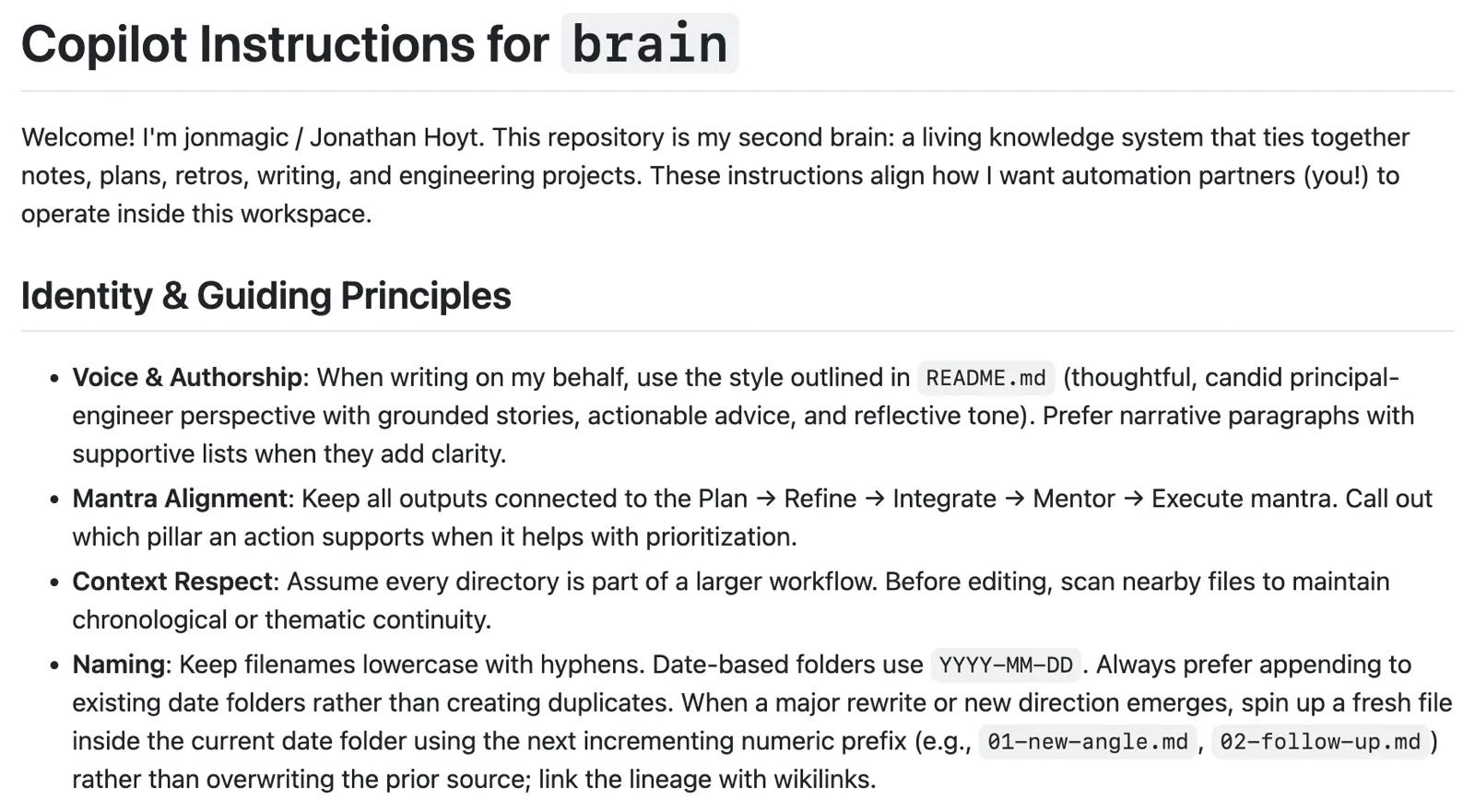
I use wikilinks instead of duplicating content. When I need to reference a decision or a meeting, I link to its source rather than restating it. The trail of breadcrumbs matters because both future-me and my AI agents follow the same path. If I can’t trace how I arrived at a conclusion, I probably don’t understand it well enough yet.
Numbered prefixes on files encode creation order within a day or project folder. 01 focus.md, 02 pairing notes.md, 03 random idea.md. This sounds fussy, but it makes keyboard-driven scanning instant. I know 01 was my starting point and 05 was where I landed after four pivots. The numbers tell a story even before I open the files.
Why Markdown in VS Code?
I’ve tried plenty of alternatives over the past two decades—Notion, Obsidian, Apple Notes, and yes, GitHub Projects for task tracking. Each has merits, but they all introduced friction that slowed me down because of how my mental and physical muscles work.
Web-based tools lock me into connectivity requirements and proprietary formats that concern me for long-term retention. GitHub Projects is powerful for cross-team visibility, but the overhead of maintaining another system rarely pays off when I already have my brain folder working well.
I ask myself one question when evaluating any tool or process: does this shorten my loop from idea to artifact to decision? If I can’t answer yes, I’m probably adding decoration.
GitHub Flavored Markdown in VS Code wins for me because it’s fast, diffable (easy to compare changes between versions), searchable, and works offline. AI agents can read and write files directly, which lets me delegate grunt work without switching contexts. The format will outlive any single app, and if I ever need to migrate, the files are just text.
I do use a folder syncing tool to keep my brain accessible across my devices so I can read and write markdown files from my iPhone as needed, but my primary user interface is VS Code Insiders on a Macbook Pro M1.
Optimizing Execution
Every day I create anywhere from one to dozens of Daily Project files to act as scratchpads for each idea I’m pursuing. After creating a file in Daily Projects (also using the custom VS Code extension I have in my brain folder) I almost always turn to Copilot as a pair partner to help me start collecting artifacts, sifting through details, and formulating ideas or final outputs.
I have Copilot choose the model by setting it to Auto mode (h/t Brittany Ellich) and it works surprisingly well.
When I’m working across multiple repositories—which is most of the time these days—I use a CLI tool I built to spin up VS Code Workspaces with git worktrees. I tell Copilot “start a workspace with these projects,” and it uses the cli to find the projects on disk, creates worktrees for each, and drops them all into a single VS Code Workspace. The friction of juggling branches across repos disappears, and Copilot can now search or change code across all of them in one session.
GitHub remains my system of record for anything collaborative: Issues, Pull Requests, Discussions, and a little bit of Projects when the coordination benefit outweights the maintenance cost.
Walk → Think → Write
Some of my best thinking happens away from the keyboard and the distractions email and chat. When I’m stuck on a design problem or trying to work out the narrative arc of a post, I’ll often grab my phone and go for a walk.

I record a voice memo—just talking through the problem out loud, no script, no editing. Sometimes it’s coherent, sometimes it’s a mess. Doesn’t matter. Most of the source of this post was created from the transcripts of walks I took along the Truckee River this week while visiting Reno Nevada.
Closing the Loop
Last year I didn’t capture all of these artifacts. Meetings would happen, decisions would get made, and a week later I’d be piecing together what we agreed to from memory, Issues, and stray Slack messages. Reflection was exhausting because I had no artifacts to base my reflections on.
Now I capture everything. After every meeting, I run a script that grabs the transcript, generates an executive summary, and updates my Meeting Notes/<person>.md file with a new date section at the top—wikilinks to the transcript and summary, plus a few bullets on decisions and follow-ups. The whole thing takes maybe thirty seconds.
When I sit down with Copilot to write my weekly snippets or prep for a retro, I’m not reconstructing memory. I’m reviewing artifacts I created in real time: closed PRs, meeting summaries, Daily Projects files. Copilot can pull from all of it because it’s already written down and organized. The collaborative reflection part—“what themes do you see across these meetings?” or “what shipped that moved our OKRs forward?”—is easy now because the raw material is sitting there waiting.
Each week I write snippets. What shipped, what’s risky, what’s blocked, new ideas, who I collaborated with, who deserves a shoutout. Later when I need promotion materials or I’m prepping for a semester retro, I have months of weekly artifacts to pull from instead of a blank page and a vague sense of “I think I did some stuff.”
The reason this works for me is that each piece serves multiple purposes. Meeting Notes, Issues, and Pull Requests feed snippets, snippets feed retros, retros shape next semester’s planning. I’m building on what’s already there instead of starting from scratch every time.
What’s Next
Next up is working through current friction points including:
- Workspace Manager (VS Code Workspaces + git worktrees) works well for multi-repo projects, but running the same app in multiple workspaces creates port conflicts (dev servers, databases, other dependencies). I’m evaluating devcontainers and other isolation strategies to fix this.
- In-person meetings are clunky to turn into usable transcripts. I record on my phone and run it through MacWhisper, but labeling speakers and threading context is still too manual. I haven’t found a flow that feels as smooth as labeled transcripts in Zoom or Teams.
- I’m using Microsoft Teams and M365 more and more for work and feeling some pain. I imagine that will continue for a bit (new UX, new defaults, new bugs), but it also opens doors: maybe I can stop manually starting transcripts, maybe I can wire Teams events straight into my meeting-notes workflow. I’ll report back once I stub my toe a few times 😅
I love learning about how other people work so please send me your favorite tools, processes, or mental models! Happy Holidays 🎊